Skip to content
Splashgain

What is an AI appointment booking agent?

An AI agent that answers your customers on WhatsApp, on the phone and on your website, offers the free times your calendar and rules allow, books, reschedules or cancels the appointment, and sends the confirmation and reminder on WhatsApp. Your team runs everything from one admin panel.

Every missed call is a missed booking

  • Calls ring out during rush hour, lunch and after closing

  • WhatsApp messages answered hours later, by which time they booked elsewhere

  • No reminders, so the slot sits empty when a customer forgets

The front desk is not slow. It is answering three channels while a waiting room watches.

One agent, three channels, one calendar

The same booking engine sits behind WhatsApp, the phone and your website, so a slot booked in one is gone in the others the same second.

WhatsApp booking

A booking in one short chat, confirmed with a reference.

How it works
  • The customer types what they want, in their own words
  • Offers two or three times that are actually free
  • Reschedule or cancel by replying, and the slot frees up
  • Every chat and every action it took is visible to your staff
AI phone receptionist

Your number answered on the first ring, every time.

How it works
  • Speaks English and Hindi, and knows your doctors and services by name
  • Several calls at once; extra callers hold, then get the next free line
  • Callers can interrupt; it listens, and ends the call politely
  • Recording, transcript and summary of every call in Conversations

Website booking page

Four taps from a link or QR code to a booking.

How it works
  • Service, staff member, date and time, then the customer’s details
  • One line of code embeds it on your website as a button
  • Your colours, form fields and messages, in four languages

Admin panel

Every booking, from every channel, in one place.

How it works
  • Dashboard, appointment list and a day calendar per staff member
  • Filter by status, staff, service or the channel it came from
  • Book walk-ins, mark no-shows, and export to Excel
  • Customer history, notes and every conversation on one screen

Reminders and updates

Fewer no-shows, without anyone making reminder calls.

How it works
  • Confirmation on WhatsApp the moment a booking is made, on any channel
  • A reminder 24 hours before, with confirm, reschedule and cancel buttons
  • Any change by staff or customer is messaged straight away

Your rules, enforced

The software checks the rules, so the AI cannot break them.

How it works
  • Staff hours, slot length, capacity per slot and a daily cap
  • Holidays, minimum notice, booking window and cancellation notice
  • The caller’s own number identifies them, so nobody books for someone else
  • Privacy notice, STOP opt-out and customer data erase for the DPDP Act

Ready to see it in action?

Or call +91 95525 86428

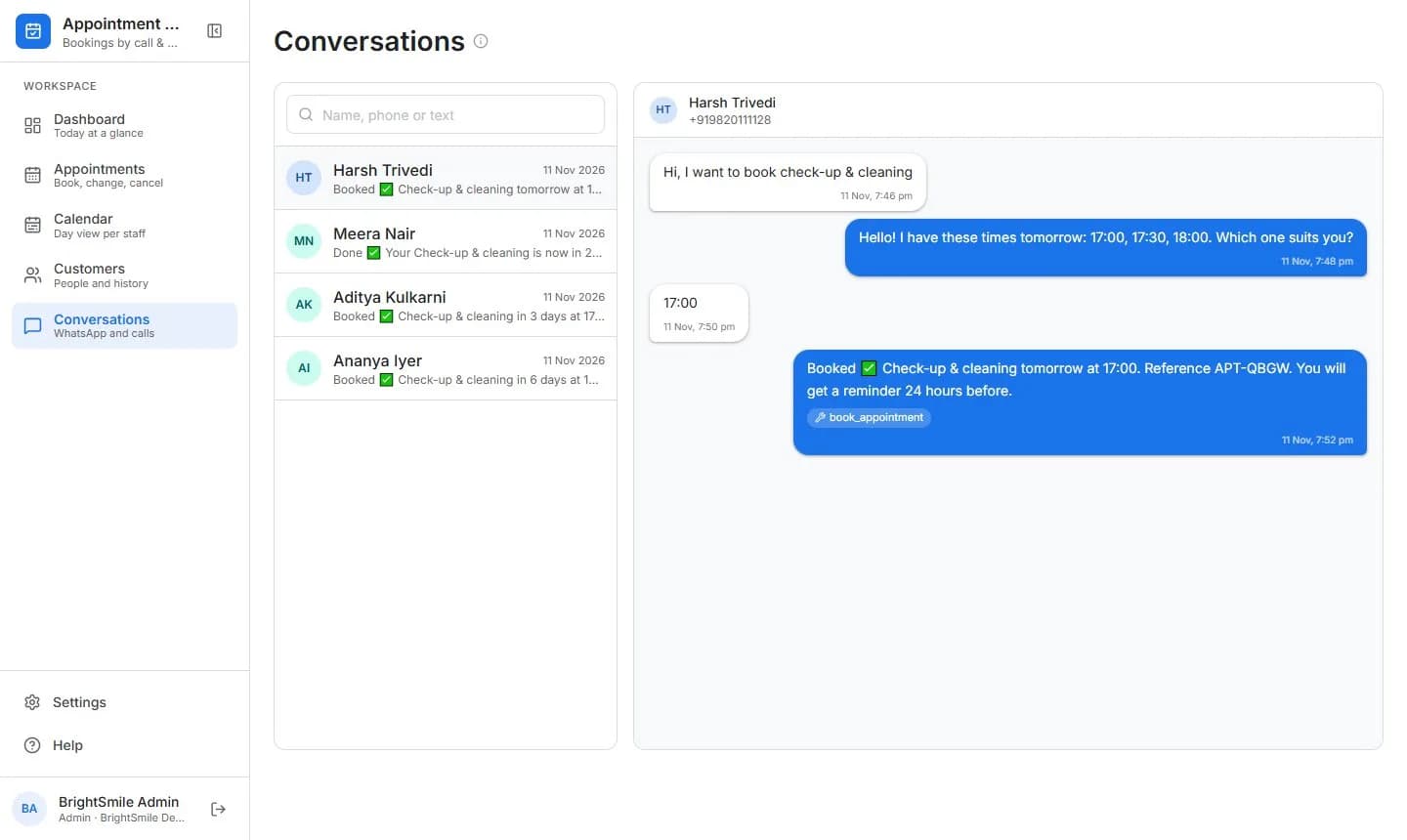
WhatsApp conversation in the admin panel where the agent books a dental check-up

A booking in the chat your customers already use

The agent reads the request, offers real free times and books the one the customer picks. Your staff see the same thread, with each action it took.

  • Real free slots, never a clash
  • Reference number and reminder sent automatically
  • Reschedule or cancel by replying
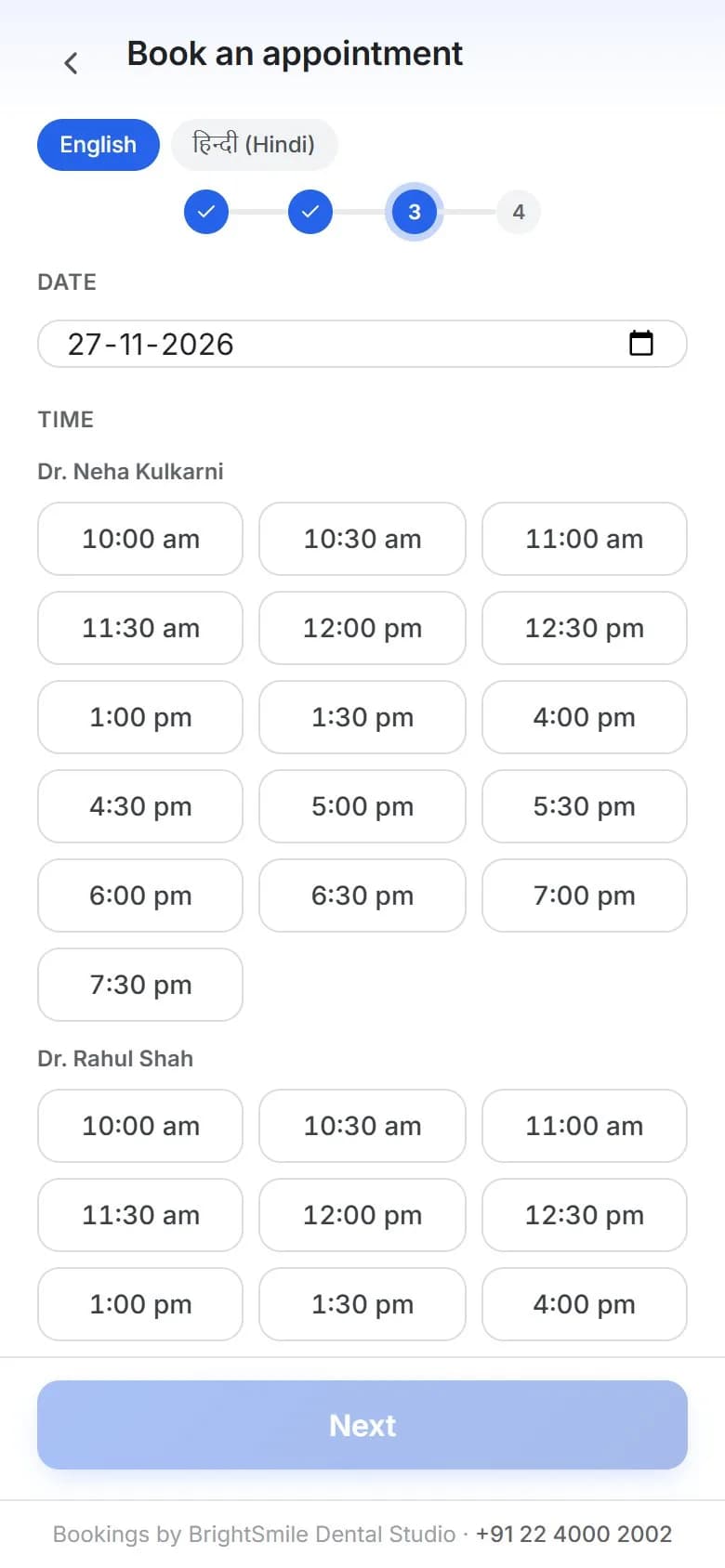
Mobile booking page showing free times per doctor for a chosen date

A booking page built for a phone screen

Share the link on Google, Instagram or a QR code at reception, or embed it on your website with one line of code.

  • Free times per doctor, live
  • English, Hindi, Marathi and Gujarati
  • Confirmation on WhatsApp
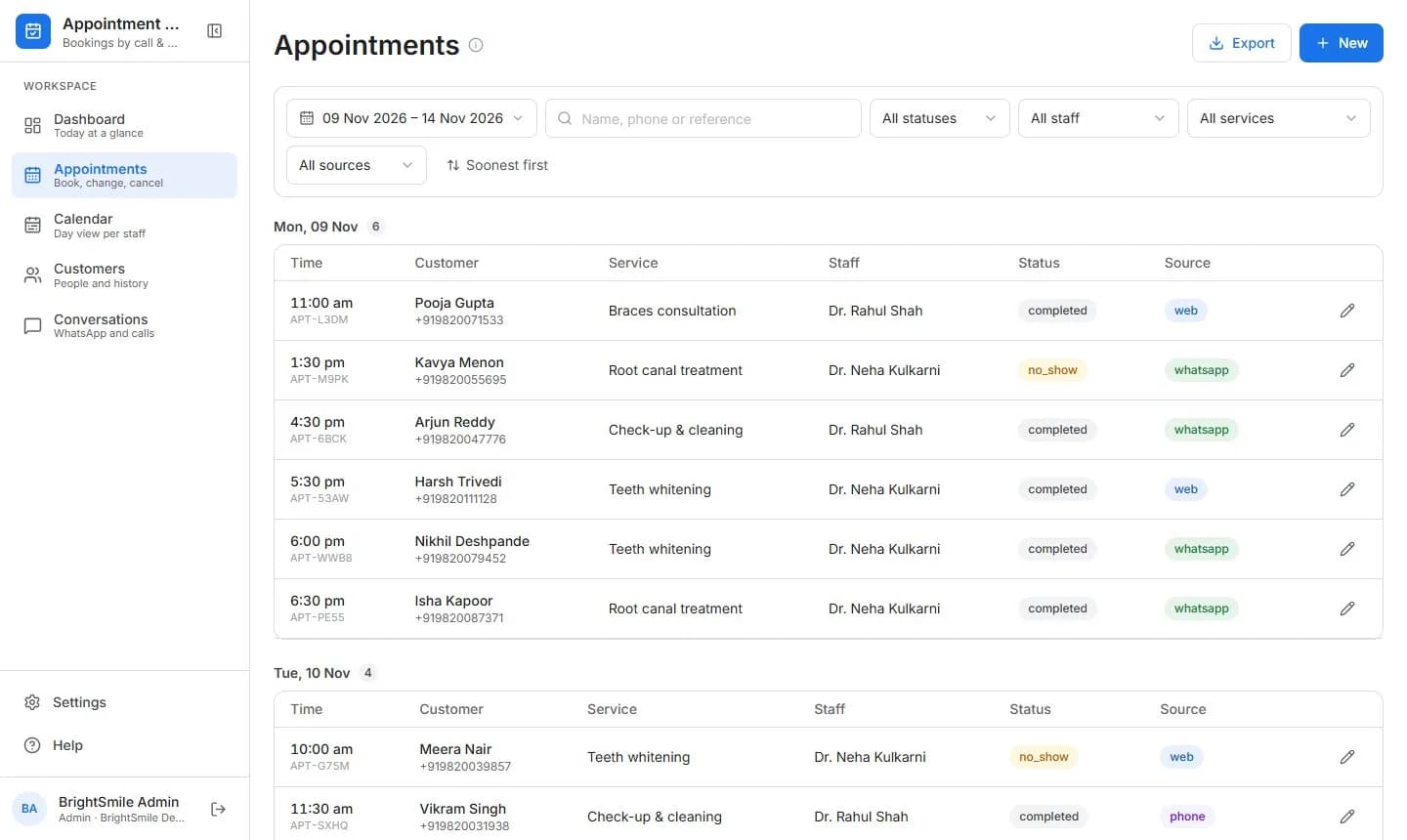
Appointments list with status and source badges for WhatsApp, web and phone

Every booking, and where it came from

Front desk and owners work from one list and calendar. Each booking shows its channel: WhatsApp, phone, web or front desk.

  • Mark completed or no-show in one click
  • Edits notify the customer on WhatsApp
  • Export to Excel any time

A booking, in five steps

  1. 1AI agent

    The customer asks

    On WhatsApp, a call or your website, any hour.

  2. 2AI agent

    Free times offered

    Only slots your rules and calendar allow.

  3. 3AI agent

    Booked and confirmed

    Reference number on WhatsApp straight away.

  4. 4AI agent

    Reminded

    A day before, with confirm, reschedule, cancel.

  5. 5Your team

    The visit

    Mark it completed or no-show; history stays.

See it book a real slot. Open the live booking page for our demo dental clinic, pick a service and a time, and watch the free slots change.

The fleet behind this agent

120+

AI agents and automations running in our own production

500+
Customers worldwide
17+
Countries served
100%
Platform uptime

What clinics and service businesses ask us first

Which businesses is it for?

Any business that runs on appointments: clinics and hospitals, dentists, physiotherapists, salons and spas, car and bike service centres, labs, consultants and coaching. Each business gets its own number, branding, services, staff and rules.

Can the AI double-book a slot?

No. The agent only asks for a booking; the booking software checks capacity, staff hours, holidays and notice periods before saving it, and checks again at the moment of booking. Two customers can never get the same slot.

Do we need a new phone number?

For WhatsApp you use your WhatsApp Business number. For calls we give you a number the AI receptionist answers, which you can forward your existing line to. The website booking page needs no number at all.

Which languages does it speak?

On WhatsApp it replies in the language the customer writes in. The phone receptionist speaks English and Hindi. The website booking page offers English, Hindi, Marathi and Gujarati.

What if a caller wants a person?

The agent records a call-back request with the reason. It sits at the top of your staff’s Conversations list until someone opens it, with the call’s recording and summary attached.

Is customer data safe?

Each business only ever sees its own customers. The customer is identified by their own phone number, the booking page links your privacy notice, customers can send STOP to opt out, and staff can erase a customer’s data on request under the DPDP Act.

How long does it take to go live?

Days, not months. You share your services, staff timings and rules, we connect your WhatsApp and phone numbers, tune the agent’s greeting and instructions with you, and put the booking link on your website.

See it book an appointment for your business.

Tell us your services, staff and timings. We will set up a demo on your own data.

Book a Demo

Or call +91 95525 86428

Free · 17 slides · PDF

Before you go: meet your 22 AI employees

Which jobs AI can take off your team, and where your people stay in charge.

  • 22 AI employees across 9 departments
  • Input → AI → result, for every role
  • Where your people always decide
  • How to go live in one day

Instant download. Three fields.

No cost. Work email and organisation only.

Book a demo

See the agent book appointments for your business