

There is a quiet cost to the current enthusiasm for AI agents: teams are putting language models into jobs that do not need one. The result is a process that is slower, more expensive and less predictable than the workflow it replaced.
We run more than 80 automations in our own production alongside our AI agents. The majority of those automations contain no language model at all. That is not a limitation. It is the design.
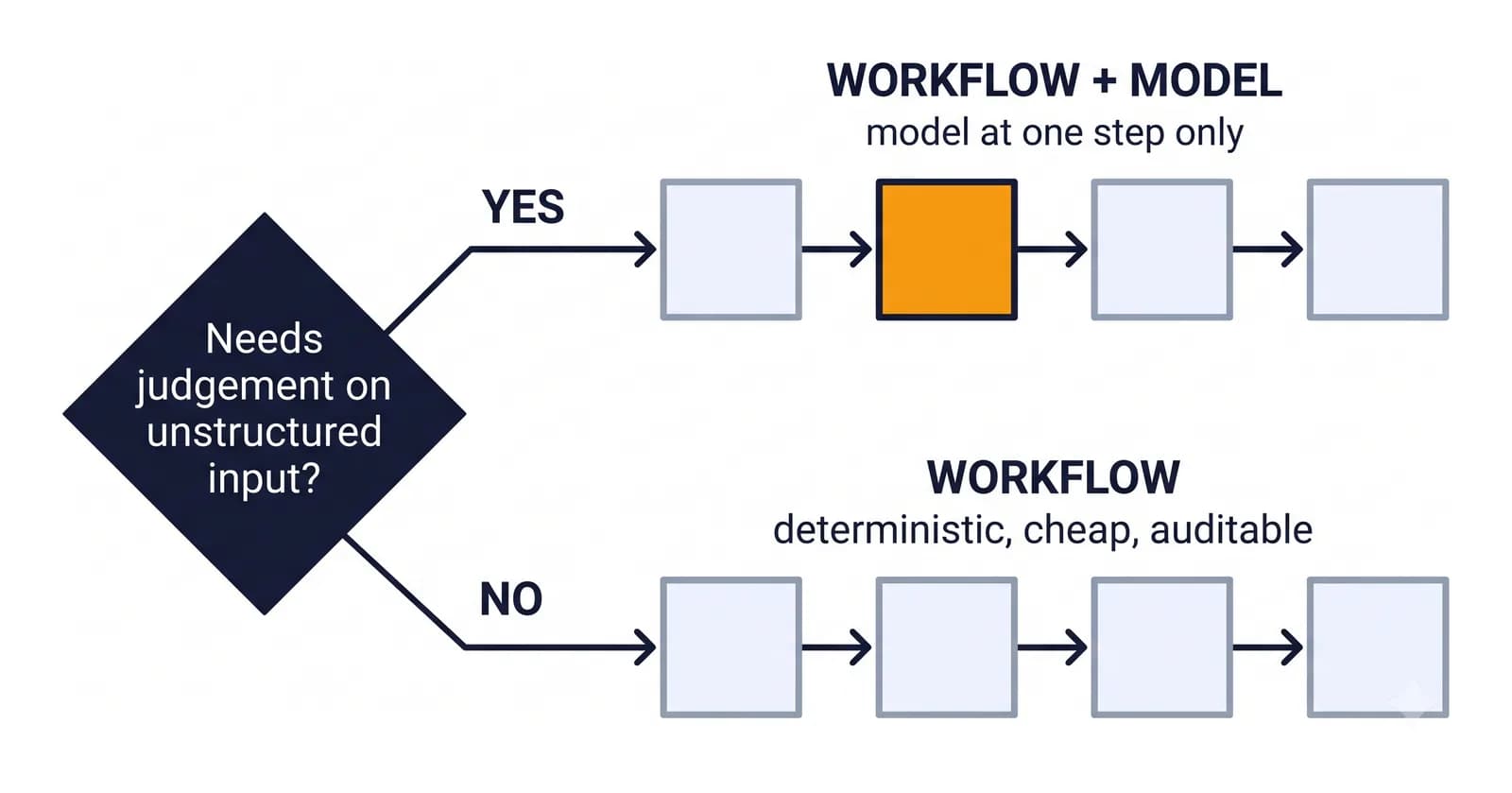
The question to ask first
Before choosing a tool, ask one question about the job:
Does any step require judgement over unstructured input?
If every step can be written as a rule — when this field changes, update that record; every morning at seven, pull these rows and send this report; if the invoice is overdue by 30 days, send reminder two — you need a workflow. A workflow is deterministic, cheap to run, easy to test and simple to explain to an auditor.
If a step requires reading an email and deciding what the sender actually wants, summarising a 40-page document, classifying a grievance written in three languages, or drafting a reply that sounds like a person — that step needs a model. Usually just that step.
The mistake: making the whole process an agent
When a process has one judgement step, the tempting design is to hand the entire thing to an agent and let it figure out the rest. It demos well. It performs badly:
- Cost scales with every step, including the ones a rule could do for free
- Behaviour varies run to run, so a process that used to be predictable is not
- Failures are harder to diagnose, because "the model decided to" is not a stack trace
- Audit gets harder, because the reasoning lives in a transcript, not a rule
The pattern that works: a workflow with a model inside it
The design we reach for most often is a deterministic workflow that calls a model at exactly the points where judgement is needed, and nowhere else.
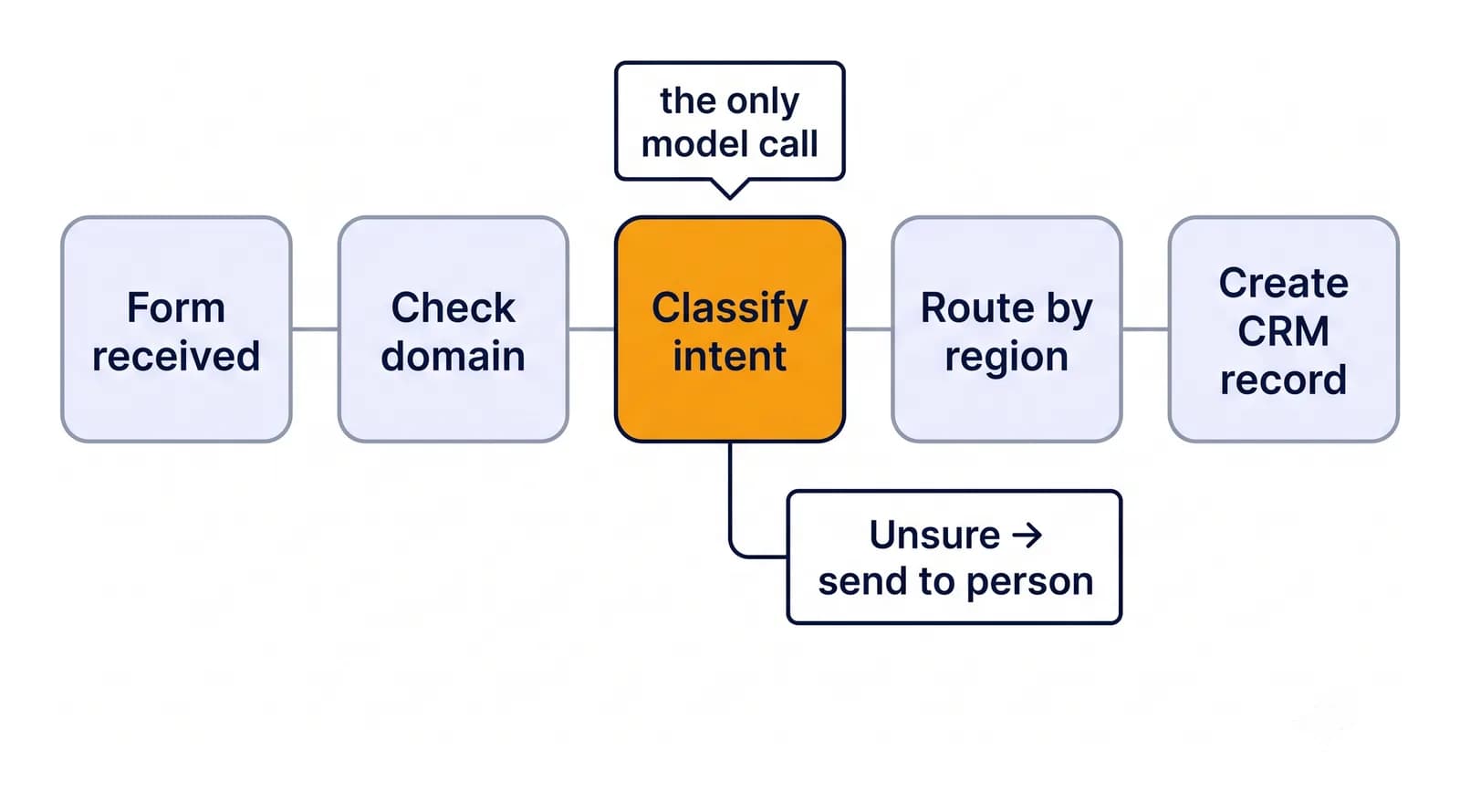
Take an inbound-enquiry process. The workflow receives the form submission, checks the email domain against a block list, looks the company up in the CRM, and routes by region — all rules. One step asks a model to read the free-text message and classify intent: a sales enquiry, a support request or a job application. The workflow then takes the classification and continues with rules again.
The model does one narrow, testable job. Everything around it stays boring. If the model is unsure, the workflow sends the case to a person rather than guessing.
The same shape holds at government scale. In a state recruitment-scrutiny deployment, eligibility checks, category and reservation rules and merit ranking are all deterministic rules. The model's only job is reading documents that arrive in dozens of formats. That split is what makes the final ranking auditable: every decision traces to a rule, and every rule's input traces to a document.
For a state admissions council verifying around 50,000 applicants a cycle, the model extracts fields from marksheets and domicile, caste and income certificates. Matching those fields against the application form and against government records is rule-based. The model reads; the rules decide.
When a genuine agent is the right answer
Agents earn their place when the path through the work is not known in advance: the agent has to decide which tool to use next based on what it just found. Investigating why a server is slow, researching a market, or working a support ticket that could need any of six systems are real agent jobs. The steps depend on the answers. That is what the word agentic is pointing at — not a chatbot with a better prompt, but a system that chooses its own next step.
Even then, the agent operates inside guardrails a workflow would recognise: a fixed set of tools, a budget of steps, a draft-and-approve gate on anything that changes a record or reaches a customer, and a log of every action.
A practical test
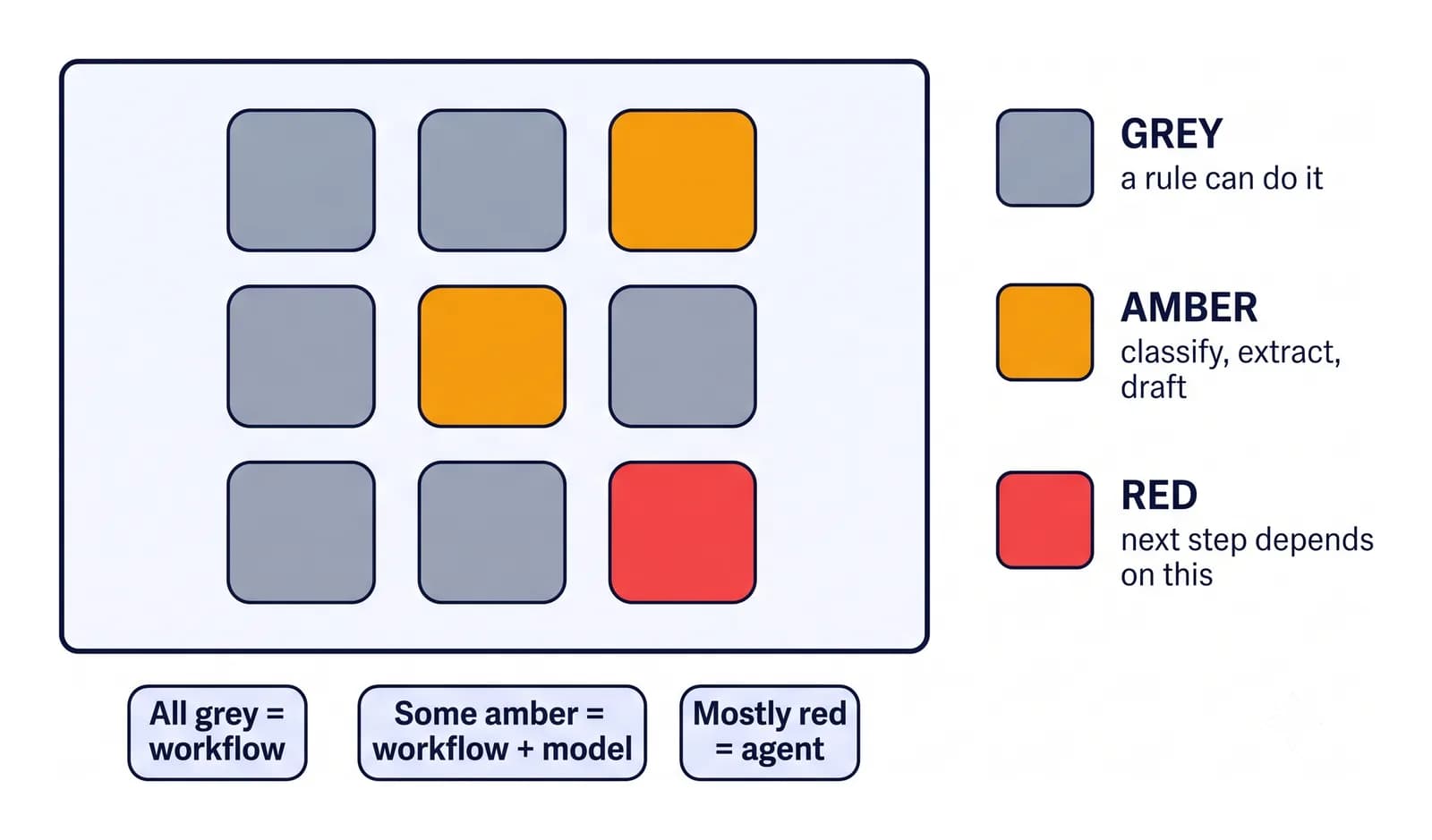
Map the process on a whiteboard, one box per step. Colour each box:
- Grey if a rule can do it
- Amber if it needs judgement on a known question — classify, extract, summarise, draft
- Red if the next step depends on what this step discovers
All grey means a workflow, with no model. A few amber boxes means a workflow that calls a model at those points. Only when red boxes dominate do you need an agent — and even then, the grey boxes around it should stay rules.
The most reliable AI systems we operate are mostly not AI. They are well-built workflows with a model placed precisely where a person's judgement used to be the bottleneck.
If you want a second pair of eyes on the colouring, the agent readiness scorecard runs the same test on one of your processes in a few minutes.
Quick answers
What is LLM workflow automation?
It is a deterministic workflow that calls a language model only at the steps that need judgement over unstructured input, such as classifying an email or extracting fields from a document. Every other step stays a rule, so the process remains cheap, testable and auditable.
When does a process need an AI agent rather than a workflow?
When the next step depends on what the previous step discovered, so the path cannot be written down in advance. Investigating an outage or working a support ticket that could touch any of several systems are agent jobs. Most business processes are not.
Why not hand the whole process to an agent?
Cost grows with every step, behaviour varies from run to run, failures are harder to diagnose and the reasoning lives in a transcript instead of a rule. A workflow with one model step avoids all four.
How do I decide which steps need a model?
Map the process one box per step. Grey boxes a rule can do, amber boxes need judgement on a known question, red boxes depend on what the step discovers. Use a model only for amber, and an agent only when red boxes dominate.